

Webhooks let your systems get real-time notifications from Verbex about call lifecycle and PCA availability. As events occur, Verbex sends POST requests with JSON payloads to your HTTPS endpoint so you can update CRMs, trigger workflows, and fetch PCA immediately.

Verbex sends real-time webhooks at Multiple key moments in a call’s lifecycle:
  • Call Started ( CallHandler.CallStarted )
  • Call Ended ( CallHandler.CallEnded )
  • Call Transfer ( CallHandler.CallTransferred )
  • PCA Completed ( callAnalysis.pcaCompleted , typically 1–30s after end)
These events let your systems react instantly—create or update CRM cases, trigger alerts, and (most importantly) fetch PCA to automate next steps such as follow-up outbound calls, notifications, or escalations.

What You Get (Benefits) 

  • Instant awareness of live calls and completion (no polling).
  • Actionable insights the moment PCA is ready.
  • Automated workflows: kick off follow-ups, send SMS/email, open tickets, or route to a human agent using PCA outcomes.
  • Operational visibility: power real-time dashboards for call status and PCA readiness.

When to Use Webhooks

Use these webhooks if you need to:
  • Show live call status in CRM/Helpdesk/BI dashboards.
  • Automate post-call actions the moment PCA is available.
  • Orchestrate follow-ups (e.g., schedule/trigger another outbound call).
  • Sync data to external systems (CRM, ticketing, data warehouse) tied to call_id.

Event Catalogue & Typical Client Actions

EventPurposeTypical Client Action
Call Started (CallHandler.CallStarted)Signals a new call session has begun.Create/attach a live engagement record; mark status = “In Progress”.
Call Ended (CallHandler.CallEnded)Signals call completion.Mark record “Completed”; prepare to await PCA.
PCA Completed (callAnalysis.pcaCompleted)PCA is ready (1–30s post-end).Fetch PCA by call_id; evaluate rules; trigger follow-ups/notifications/escalations.
Call Transfer ( CallHandler.CallTransferred )Signals a call transfer has been initiated. Triggered when the AI agent transfers the call to a human agent or external number.Route call to receiving agent using transfer_to destination; update CRM record with transfer status and reason; send context/transcript to receiving agent.
Note: Events can arrive out of order due to network conditions. Use traceId to deduplicate; treat call_id as the stable identity for your records.

Endpoint Settings

Basic Requirements

  • HTTP Method: POST
  • Protocol: HTTPS (required)
  • Domain: Custom domain (required; IP addresses not allowed)
  • Content-Type: application/json

Request Format


POST /your-webhook-endpoint HTTP/1.1
Content-Type: application/json
User-Agent: ReactorNetty/1.1.13
X-Webhook-Event: CallHandler.CallEnded
X-Webhook-Traceid: 94c950a0-1694-4b7c-9891-9364c261e4e1
X-Webhook-Timestamp: 2025-11-10T01:01:14.552985018Z
Custom Headers:
  • X-Webhook-Event: Event name (e.g., CallHandler.CallEnded)
  • X-Webhook-Traceid: Webhook unique identifier (same as traceId in the body)
  • X-Webhook-Timestamp: Timestamp in ISO 8601 format

How to Configure Webhook in Verbex:

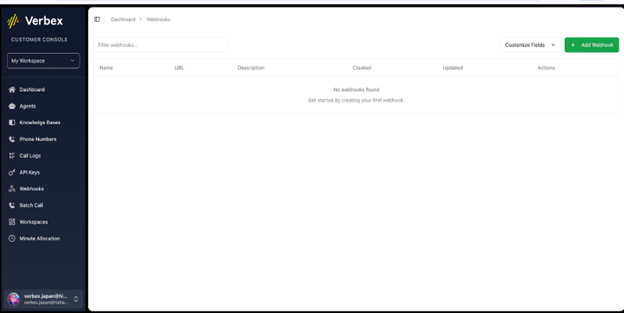
  1. Open the Verbex Dashboard. Go to Webhooks. Hook1 Pn
  2. Click Add Webhook and enter your HTTPS endpoint (domain URL). Hook2 Pn
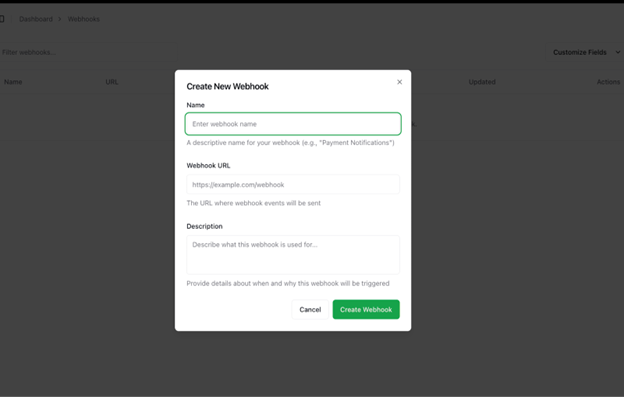
  3. Once the webhook endpoint is added, click on create webhook. That’s how the endpoint is registered in verbex.

Webhook Data Format

Call Started Event


{
  "organizationId": "e654409f-0105-4c5e-8d67-c3c2998056c6",
  "traceId": "ff6e9643-994b-42fc-8a75-8c1a219243e4",
  "eventName": "CallHandler.CallStarted",
  "timestamp": 1762670195.24565582,
  "payload": {
    "call_id": "6910366f2dc3a75642b5a4c0",
    "agent_id": "c1b13ac3-aaf0-407f-8de2-19933d39afe0",
    "status": "success"
  }
}

Call Ended Event


{
  "organizationId": "d1c7159f-c2ec-4d24-9d1b-bdef8a2614c8",
  "traceId": "598ed907-1a67-492f-999f-d172e473c823",
  "eventName": "CallHandler.CallEnded",
  "timestamp": 1762408841.037144,
  "payload": {
    "call_id": "690c38dd1a470176859508ef",
    "agent_id": "97de52b5-ed58-4c2b-81c0-e756cb65c541",
    "status": "success"
  }
}

PCA Completed Event


{
  "organizationId": "d1c7159f-c2ec-4d24-9d1b-bdef8a2614c8",
  "traceId": "0d87d633-ce6b-40fb-a54f-722b1bbd8f8b",
  "eventName": "callAnalysis.pcaCompleted",
  "timestamp": 1762153092.920426,
  "payload": {
    "call_id": "690852542548d87bb5238118",
    "agent_id": "100fd531-5a50-4f69-9fb7-7e5e73640850",
    "status": "success",
    "reason": "success",
    "timestamp": 1762153092420
  }
}

Call Transfer Event

The Call Transfer event is triggered when the AI agent initiates a transfer of the call to a human agent or external destination. This event provides comprehensive details about the transfer attempt, including the transfer destination, call summary, and transcript.
{
  "call_id": "697a020fc0baee039d0013b4",
  "agent_id": "d077dc85-ee45-48cd-ac65-fd49df53cdba",
  "status": "failed",
  "transfer_to": "sip:01751373839@115.127.146.155",
  "caller": {
    "phone_number": "+8801762668080"
  },
  "call_summary": {
    "duration_seconds": 45.621591,
    "topics_discussed": [
      "call_transfer_request"
    ],
    "actions_taken": [
      "Acknowledged transfer request",
      "Initiated call transfer to human agent"
    ],
    "transfer_reason": "Customer requested to speak with a human agent.",
    "customer_sentiment": "neutral",
    "unresolved_issues": []
  },
  "transcript": [
    {
      "role": "user",
      "content": "Hi, I need assistance with my account."
    },
    {
      "role": "agent",
      "content": "How can I help you today?"
    },
    {
      "role": "user",
      "content": "Okay. Can you transfer the call to a human agent?"
    },
    {
      "role": "agent",
      "content": "Of course, I'll transfer you to a human agent now. Please hold on a moment."
    },
    {
      "role": "agent",
      "content": "Please wait while we connect you to a human agent."
    }
  ],
  "metadata": {
    "call_start_time": "2026-01-28T12:33:37.475817+00:00",
    "call_end_time": "2026-01-28T12:34:23.097263+00:00",
    "language": "en-US"
  }
}

Call Transfer Event Field Descriptions

FieldTypeDescription
call_idstringUnique identifier for the call. Used as a stable identifier for your records.
agent_idstringUnique identifier for the AI agent handling the call.
statusstringTransfer status. Values: pending, initiated, success, failed. Indicates whether the transfer was successfully completed or failed.
transfer_tostringDestination of the transfer. Can be a SIP address, phone number, or internal extension.
caller.phone_numberstringPhone number of the caller initiating the call.
call_summary.duration_secondsnumberTotal duration of the call in seconds before transfer was initiated.
call_summary.topics_discussedarrayList of topics discussed during the call.
call_summary.actions_takenarrayList of actions performed by the AI agent during the call.
call_summary.transfer_reasonstringReason provided for initiating the transfer.
call_summary.customer_sentimentstringOverall sentiment of the customer. Values: positive, neutral, negative.
call_summary.unresolved_issuesarrayList of issues not resolved before transfer.
transcriptarrayComplete transcript of the call conversation.
transcript[].rolestringSpeaker in the transcript. Values: user or agent.
transcript[].contentstringContent of the message spoken.
metadata.call_start_timestringISO 8601 timestamp of when the call started.
metadata.call_end_timestringISO 8601 timestamp of when the call ended or transfer was initiated.
metadata.languagestringLanguage code of the call (e.g., “en-US”).

Implementation Notes

Important: The webhook payload structure may change without notice. On the receiving side, please note the following:
  • It is recommended to store the entire payload received as JSON data.
  • Consider the possibility that new fields may be added.
  • Implement it so that unknown fields do not cause errors.

Call Transfer Event Implementation Notes

Transfer Status Tracking: Monitor the status field to determine if a transfer was successful. Failed transfers may require fallback handling or alerting. Transfer Destination Validation: Validate the transfer_to field format before routing. Ensure it matches your system’s expected destination format (SIP URI, phone number, etc.). Preserve Call Context: Use call_id as the primary identifier to correlate this event with the original Call Started event for complete call lifecycle tracking. Customer Sentiment Analysis: Consider the customer_sentiment field when prioritizing transfers or determining escalation urgency. Unresolved Issues: Review the unresolved_issues array to ensure the receiving agent has context about what was not resolved. Transcript Availability: The complete transcript is included to help the receiving agent understand the conversation history and customer needs. Typical Client Actions:
  • Route call to the receiving agent using the transfer_to destination
  • Update CRM record with transfer status, reason, and customer sentiment
  • Send complete transcript and unresolved issues to the receiving agent
  • Track transfer success rates for quality assurance
  • Log transfer reason and customer sentiment for analytics

Field Descriptions

FieldTypeDescription
organizationIdstringOrganization ID
traceIdstringWebhook unique identifier (used for deduplication)
eventNamestringEvent type
timestampnumberUNIX timestamp (seconds)
payload.call_idstringCall ID
payload.agent_idstringAI agent ID
payload.statusstringStatus
payload.reasonstringReason (PCA only)
payload.timestampnumberUNIX timestamp (milliseconds, PCA only)